My Journey to CCIE

Sunday, 6 March 2016

Integrated services

Integrated services

From Wikipedia, the free encyclopedia
In computer networking, IntServ or integrated services is an architecture that specifies the elements to guarantee quality of service (QoS) on networks. IntServ can for example be used to allow video and sound to reach the receiver without interruption.
IntServ specifies a fine-grained QoS system, which is often contrasted with DiffServ's coarse-grained control system.
The idea of IntServ is that every router in the system implements IntServ, and every application that requires some kind of guarantees has to make an individual reservation. Flow Specs describe what the reservation is for, while RSVP is the underlying mechanism to signal it across the network.

Contents

  • 1 Flow Specs
  • 2 RSVP
  • 3 Problems
  • 4 References
  • 5 External links

Flow Specs

There are two parts to a flow spec:
  • What does the traffic look like? Done in the Traffic SPECification part, also known as TSPEC.
  • What guarantees does it need? Done in the service Request SPECification part, also known as RSPEC.
TSPECs include token bucket algorithm parameters. The idea is that there is a token bucket which slowly fills up with tokens, arriving at a constant rate. Every packet which is sent requires a token, and if there are no tokens, then it cannot be sent. Thus, the rate at which tokens arrive dictates the average rate of traffic flow, while the depth of the bucket dictates how 'bursty' the traffic is allowed to be.
TSPECs typically just specify the token rate and the bucket depth. For example, a video with a refresh rate of 75 frames per second, with each frame taking 10 packets, might specify a token rate of 750 Hz, and a bucket depth of only 10. The bucket depth would be sufficient to accommodate the 'burst' associated with sending an entire frame all at once. On the other hand, a conversation would need a lower token rate, but a much higher bucket depth. This is because there are often pauses in conversations, so they can make do with less tokens by not sending the gaps between words and sentences. However, this means the bucket depth needs to be increased to compensate for the traffic being burstier.
RSPECs specify what requirements there are for the flow: it can be normal internet 'best effort', in which case no reservation is needed. This setting is likely to be used for webpages, FTP, and similar applications. The 'Controlled Load' setting mirrors the performance of a lightly loaded network: there may be occasional glitches when two people access the same resource by chance, but generally both delay and drop rate are fairly constant at the desired rate. This setting is likely to be used by soft QoS applications. The 'Guaranteed' setting gives an absolutely bounded service, where the delay is promised to never go above a desired amount, and packets never dropped, provided the traffic stays within spec.

RSVP

Main article: Resource reservation protocol
The Resource Reservation Protocol (RSVP) is described in RFC 2205. All machines on the network capable of sending QoS data send a PATH message every 30 seconds, which spreads out through the networks. Those who want to listen to them send a corresponding RESV (short for "Reserve") message which then traces the path backwards to the sender. The RESV message contains the flow specs.
The routers between the sender and listener have to decide if they can support the reservation being requested, and, if they cannot, they send a reject message to let the listener know about it. Otherwise, once they accept the reservation they have to carry the traffic.
The routers then store the nature of the flow, and also police it. This is all done in soft state, so if nothing is heard for a certain length of time, then the reader will time out and the reservation will be cancelled. This solves the problem if either the sender or the receiver crash or are shut down incorrectly without first cancelling the reservation. The individual routers may, at their option, police the traffic to check that it conforms to the flow specs.

Problems

In order for IntServ to work, all routers along the traffic path must support it. Furthermore, many states must be stored in each router. As a result, IntServ works on a small-scale, but as you scale up to a system the size of the Internet, it is difficult to keep track of all of the reservations.[1]
One way to solve the scalability problem is by using a multi-level approach, where per-microflow resource reservation (i.e. resource reservation for individual users) is done in the edge network, while in the core network resources are reserved for aggregate flows only. The routers that lie between these different levels must adjust the amount of aggregate bandwidth reserved from the core network so that the reservation requests for individual flows from the edge network can be better satisfied.[2]

References


  • Int-Serv Architecture, retrieved 2011-12-09
    1. RFC 3175
    • "Deploying IP and MPLS QoS for Multiservice Networks: Theory and Practice" by John Evans, Clarence Filsfils (Morgan Kaufmann, 2007, ISBN 0-12-370549-5)

    External links

    • RFC 1633 - Integrated Services in the Internet Architecture: an Overview
    • RFC 2211 - Specification of the Controlled-Load Network Element Service
    • RFC 2212 - Specification of Guaranteed Quality of Service
    • RFC 2215 -General Characterization Parameters for Integrated Service Network Elements
    • RFC 2205 - Resource ReSerVation Protocol (RSVP)
    • Cisco.com, Cisco Whitepaper about IntServ and DiffServ

    Posted by Humberto Perez at 00:19
    Email ThisBlogThis!Share to XShare to FacebookShare to Pinterest
    Labels: IntServ, QOS

    Thursday, 3 March 2016

    OSPF NSSA

    Introduction

    The OSPF not-so-stubby area (NSSA) feature is described by RFC 1587 leavingcisco.com and is first introduced in Cisco IOS® Software release 11.2. It is a non-proprietary extension of the existing stub area feature that allows the injection of external routes in a limited fashion into the stub area. This document explains how the NSSA feature works.
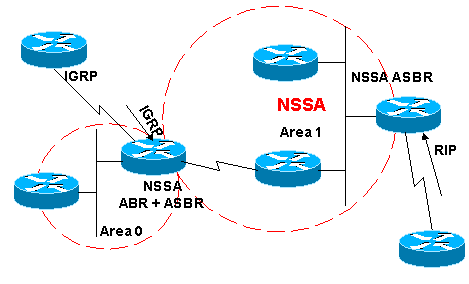
    Redistribution into an NSSA area creates a special type of link-state advertisement (LSA) known as type 7, which can only exist in an NSSA area. An NSSA autonomous system boundary router (ASBR) generates this LSA and an NSSA area border router (ABR) translates it into a type 5 LSA, which gets propagated into the OSPF domain. The network diagram demonstrates this principle.

    Prerequisites

    Requirements

    Refer to this network diagram as you use this document:
    nssa.gif
    In the network diagram, Area 1 is defined as a stub area. IGRP routes cannot be propagated into the OSPF domain because redistribution is not allowed in the stub area. However, if we define Area 1 as NSSA, we can inject IGRP routes into the OSPF NSSA domain with the creation of type 7 LSAs. Redistributed RIP routes are not allowed in Area 1 because NSSA is an extension to the stub area. The stub area characteristics still exist, which includes no type 5 LSAs allowed.

    Components Used

    This document is not restricted to specific software and hardware versions.
    The information presented in this document was created from devices in a specific lab environment. All of the devices used in this document started with a cleared (default) configuration. If you are working in a live network, ensure that you understand the potential impact of any command before using it.

    What Is a Type 7 LSA?

    This is a type 7 LSA that is generated by an NSSA ASBR. Type 5 LSAs are not allowed in NSSA areas, so the NSSA ASBR generates a type 7 LSA instead, which remains within the NSSA. This type 7 LSA gets translated back into a type 5 by the NSSA ABR.
    LS age: 36
      Options: (No TOS-capability, No Type 7/5 translation, DC)
      LS Type: AS External Link
      Link State ID: 10.10.10.0 (External Network Number)
      Advertising Router: 141.108.1.21
      LS Seq Number: 80000001
      Checksum: 0x4309
      Length: 36
      Network Mask: /24
            Metric Type: 2 (Larger than any link state path)
            TOS: 0 
            Metric: 20 
            Forward Address: 9.9.9.9
            External Route Tag: 0
    This output looks similar to an external LSA. These are some important characteristics about this output:
    • Bit P—This bit is used in order to tell the NSSA ABR whether to translate type 7 into type 5.
    • No Type 7/5 translation means bit P = 0.
    • Type 7/5 translation means bit P = 1.
    • If bit P = 0, then the NSSA ABR must not translate this LSA into Type 5. This happens when NSSA ASBR is also an NSSA ABR.
    • If bit P = 1, then the NSSA ABR must translate this type 7 LSA into a type 5 LSA. If there are multiple NSSA ABRs, the one with highest router ID.

    Configuration Tasks

    There are two flavors in NSSA, just like in stub areas. There are NSSAs that block type 5 and type 4 LSAs, but allow type 3 LSAs, and there are NSSA totally stub areas, which allow only summary default routes and filters everything else.

    Defining a Not-So-Stubby Area

    In order to make a stub area into an NSSA, issue this command under the OSPF configuration:
    router ospf 1
     Area 1 nssa
    
    This command must be configured on every single router in Area 1. After you define Area 1 as an NSSA, it must have these characteristics:
    • No Type 5 LSAs are allowed in Area 1. This means no RIP routes are allowed in Area 1.
    • All IGRP routes are redistributed as type 7. This type 7 can only exist within NSSA.
    • All type 7 LSAs are translated into type 5 LSAs by the NSSA ABR and are leaked into the OSPF domain as type 5 LSAs.

    Defining an NSSA Totally Stub Area

    In order to configure an NSSA totally stub area, issue this command under the OSPF configuration:
    router ospf 1
     Area 1 nssa no-summary
    
    Configure this command on NSSA ABRs only. After you define the NSSA totally stub area, Area 1 has these characteristics in addition to the NSSA characteristics:
    • No type 3 or 4 summary LSAs are allowed in Area 1. This means no inter-area routes are allowed in Area 1.
    • A default route is injected into the NSSA totally stub area as a type 3 summary LSA.

    Filtering in NSSA

    There are situations where there is no need to inject external routes into the NSSA as type 7. This situation usually occurs when an ASBR is also an NSSA ABR. When redistribution takes place in this scenario, the router generates type 5 as well as type 7 LSAs. You can prevent the router from creating type 7 LSAs for NSSA with this command:
    router ospf 1
     Area 1 nssa no-redistribution
    
    In the network diagram, Area 1 is configured with the no-redistribution option. This means that all IGRP routes are redistributed into area 0, but no type 7 LSAs are generated for Area 1. Only configure this command on an NSSA ASBR that is also an ABR.
    nssa1.gif
    Another case of filtering is when you need to prevent the type 7 LSAs from being translated outside the NSSA. In other words, when you want to control which type 7 LSAs get translated into type 5. For example, you have a RIP learned route 141.108.10.0/24 that is injected into the OSPF NSSA Area 1. You do not want this route to be leaked into the rest of the OSPF areas. Use this configuration on either the NSSA ASBR or the NSSA ABR in order to accomplish this:
    router ospf 1
     summary-address 141.108.10.0 255.255.255.0 not-advertise
    
    This configuration generates a type 7 LSA that is not translated into type 5 by the NSSA ABR.

    Default Route in NSSA

    There are two ways to have a default route in an NSSA. When you configure an area as NSSA, by default the NSSA ABR does not generate a default summary route. In the case of a stub area or an NSSA totally stub area, the NSSA ABR does generate a default summary route.

    Default Summary Route

    By defining an area as a NSSA totally stub area, the NSSA ABR generates a default summary route. As mentioned, if the NSSA area were not defined as totally stub, then a default summary route is not generated by NSSA ABR. This configuration generates a default summary route for a NSSA totally stub area.
    router ospf 1
     Area 1 nssa no-summary
    

    Default Type 7

    This configuration generates a type 7 default route. You can configure this command on any NSSA ASBR or NSSA ABR with these rules:
    • NSSA ASBR can generate a default only when it has a default route in its routing table.
    • The default route must be known through non-OSPF protocol
    • NSSA ABR can generate a default route with or without a default route in its own routing table.
    This command is used in order to generate an NSSA default route:
    router ospf 1
     Area 1 nssa default-information-originate

    Posted by Humberto Perez at 23:29
    Email ThisBlogThis!Share to XShare to FacebookShare to Pinterest

    OSPF down bit set

    OSPF--Down Bit

    I’ve seen the same question in several blogs, so today I will try to turn this subject inside-out.
    Let’s focus on the following scenario:
    The following sequence takes place, which can lead to a potential routing loop:
    1. R2 sends an LSA1 or LSA2 to PE1
    2. PE1 receives the intra-area OSPF route from R2 and redistributes it into MP-BGP.
    3. The receiving PE router, let’s say PE2, redistributes the MP-BGP route into OSPF as an LSA3 (remember that MPLS backbone acts as an OSPF superbackbone)
    4. LSA3 is propagated across the OSPF area and received by the other PE router, PE3 in our diagram, which is attached to the same OSPF area 1.
    5. Because PE3 has the same route learned by two protocols (OSPF and MP-BGP), it has to make a decision based on the administrative distance. Because the administrative distance of OSPF is better than the administrative distance of MP-iBGP, it selects the OSPF route. Therefore, PE3 redistributes the route OSPF back into the MP-BGP process, potentially resulting in a routing loop.
    This is why it’s completely necessary to have a mechanism to break the loop, and OSPF down bit is that mechanism.
    The down bit  is a bit located in the LSA Header, and its function is to avoid loops in MPLS-VPN environments when using OSPF as PE-CE protocol.


    When PE2 redistributes the MP-BGP route into OSPF, it sets up the down bit, or downward, on the LSA3. So when PE3 receives that LSA3, it doesn’t take it into account.
    R1#sh ip ospf datab
    
                OSPF Router with ID (1.1.1.1) (Process ID 100)
      Router Link States (Area 1)
    
    Link ID         ADV Router      Age         Seq#       Checksum Link count
    1.1.1.1         1.1.1.1         690         0x8000000D 0x007847 5
    103.103.103.3   103.103.103.3   879         0x80000009 0x006DEE 2
    200.200.200.2   200.200.200.2   1040        0x8000000A 0x00789F 2
    
      Summary Net Link States (Area 1)
    
    Link ID         ADV Router      Age         Seq#       Checksum
    2.2.2.2         103.103.103.3   108         0x80000001 0x00F583
    2.2.2.2         200.200.200.2   108         0x80000001 0x00DA7B
    10.10.22.0      103.103.103.3   98          0x80000001 0x005AFD
    10.10.22.0      200.200.200.2   98          0x80000001 0x003FF5
    
    R1#
    R1#sh ip ospf databa summ 2.2.2.2
    
                OSPF Router with ID (1.1.1.1) (Process ID 100)
      Summary Net Link States (Area 1)
    
      Routing Bit Set on this LSA in topology Base with MTID 0
      LS age: 133
      Options: (No TOS-capability, DC, Downward)
      LS Type: Summary Links(Network)
      Link State ID: 2.2.2.2 (summary Network Number)
      Advertising Router: 103.103.103.3
      ...
    
      Routing Bit Set on this LSA in topology Base with MTID 0
      LS age: 133
      Options: (No TOS-capability, DC, Downward)
      LS Type: Summary Links(Network)
      Link State ID: 2.2.2.2 (summary Network Number)
      Advertising Router: 200.200.200.2
    R1#
    PE3#sh ip ospf 100 databa
                OSPF Router with ID (103.103.103.3) (Process ID 100)
      Router Link States (Area 1)
    
    Link ID         ADV Router      Age         Seq#       Checksum Link count
    1.1.1.1         1.1.1.1         649         0x8000000D 0x007847 5
    103.103.103.3   103.103.103.3   836         0x80000009 0x006DEE 2
    200.200.200.2   200.200.200.2   1000        0x8000000A 0x00789F 2
    
      Summary Net Link States (Area 1)
    
    Link ID         ADV Router      Age         Seq#       Checksum
    2.2.2.2         103.103.103.3   65          0x80000001 0x00F583
    2.2.2.2         200.200.200.2   67          0x80000001 0x00DA7B
    10.10.22.0      103.103.103.3   55          0x80000001 0x005AFD
    10.10.22.0      200.200.200.2   57          0x80000001 0x003FF5
    PE3#
    PE3#sh ip ospf databa summ 2.2.2.2
    
                OSPF Router with ID (103.103.103.3) (Process ID 100)
      Summary Net Link States (Area 1)
    
      LS age: 146
      Options: (No TOS-capability, DC, Downward)
      LS Type: Summary Links(Network)
      Link State ID: 2.2.2.2 (summary Network Number)
      Advertising Router: 103.103.103.3
      ...
    
      LS age: 148
      Options: (No TOS-capability, DC, Downward)
      LS Type: Summary Links(Network)
      Link State ID: 2.2.2.2 (summary Network Number)
      Advertising Router: 200.200.200.2
      ...
    PE3#
    This down bit is present only in the LSA3. LSA5 and LSA7 doesnt have this bit in its headers.
    Let’s check this statement making PE2 and PE3 redistribute the route as LSA5. In order to do that, I will change the ospf-domain in PE1:
    PE1#conf term
    PE1(config)#router ospf 100
    PE1(config-router)#domain-id 1.1.1.1
    PE1(config-router)#end
    PE1#
    R1#sh ip ospf data
                OSPF Router with ID (1.1.1.1) (Process ID 100)
      Router Link States (Area 1)
    
    Link ID         ADV Router      Age         Seq#       Checksum Link count
    1.1.1.1         1.1.1.1         898         0x8000000D 0x007847 5
    103.103.103.3   103.103.103.3   1087        0x80000009 0x006DEE 2
    200.200.200.2   200.200.200.2   1249        0x8000000A 0x00789F 2
    
      Type-5 AS External Link States
    
    Link ID         ADV Router      Age         Seq#       Checksum Tag
    2.2.2.2         103.103.103.3   56          0x80000001 0x009F19 3489725929
    2.2.2.2         200.200.200.2   56          0x80000001 0x008411 3489725929
    10.10.22.0      103.103.103.3   66          0x80000001 0x000493 3489725929
    10.10.22.0      200.200.200.2   66          0x80000001 0x00E88B 3489725929
    R1#
    R1#sh ip ospf databa extern 2.2.2.2
    
                OSPF Router with ID (1.1.1.1) (Process ID 100)
      Type-5 AS External Link States
    
      Routing Bit Set on this LSA in topology Base with MTID 0
      LS age: 64
      Options: (No TOS-capability, DC)
      LS Type: AS External Link
      Link State ID: 2.2.2.2 (External Network Number )
      Advertising Router: 103.103.103.3
      ...
    
      Routing Bit Set on this LSA in topology Base with MTID 0
      LS age: 64
      Options: (No TOS-capability, DC)
      LS Type: AS External Link
      Link State ID: 2.2.2.2 (External Network Number )
      Advertising Router: 200.200.200.2
      ...
    R1#
    PE3#sh ip ospf 100 datab
                OSPF Router with ID (103.103.103.3) (Process ID 100)
      Router Link States (Area 1)
    
    Link ID         ADV Router      Age         Seq#       Checksum Link count
    1.1.1.1         1.1.1.1         851         0x8000000D 0x007847 5
    103.103.103.3   103.103.103.3   1038        0x80000009 0x006DEE 2
    200.200.200.2   200.200.200.2   1202        0x8000000A 0x00789F 2
    
      Type-5 AS External Link States
    Link ID         ADV Router      Age         Seq#       Checksum Tag
    2.2.2.2         103.103.103.3   7           0x80000001 0x009F19 3489725929
    2.2.2.2         200.200.200.2   9           0x80000001 0x008411 3489725929
    10.10.22.0      103.103.103.3   17          0x80000001 0x000493 3489725929
    10.10.22.0      200.200.200.2   19          0x80000001 0x00E88B 3489725929
    PE3#
    PE3#sh ip ospf 100 databa extern 2.2.2.2
    
                OSPF Router with ID (103.103.103.3) (Process ID 100)
      Type-5 AS External Link States
    
      LS age: 30
      Options: (No TOS-capability, DC)
      LS Type: AS External Link
      Link State ID: 2.2.2.2 (External Network Number )
      Advertising Router: 103.103.103.3
      ...
    
      LS age: 32
      Options: (No TOS-capability, DC)
      LS Type: AS External Link
      Link State ID: 2.2.2.2 (External Network Number )
      Advertising Router: 200.200.200.2
      ...
    PE3#
    In order to check if LSA7 has this bit, I change the area type and redistribution in PE2 and PE3:
    PE2(config)#router ospf 100
    PE2(config-router)#redis bgp 65001 sub nssa-only
    PE2(config-router)#area 1 nssa
    PE2(config-router)#end
    PE2#
    PE3(config)#router ospf 100
    PE3(config-router)#redis bgp 65001 sub nssa-only
    PE3(config-router)#area 1 nssa
    PE3(config-router)#end
    PE3#
    R1#sh ip ospf databa
    
                OSPF Router with ID (1.1.1.1) (Process ID 100)
      Router Link States (Area 1)
    
    Link ID         ADV Router      Age         Seq#       Checksum Link count
    1.1.1.1         1.1.1.1         75          0x80000010 0x00189E 5
    103.103.103.3   103.103.103.3   80          0x8000000B 0x000F45 2
    200.200.200.2   200.200.200.2   80          0x8000000C 0x001AF5 2
    
      Type-7 AS External Link States (Area 1)
    
    Link ID         ADV Router      Age         Seq#       Checksum Tag
    2.2.2.2         103.103.103.3   10          0x80000001 0x003E54 3489725929
    2.2.2.2         200.200.200.2   10          0x80000001 0x000869 3489725929
    10.10.22.0      103.103.103.3   223         0x80000002 0x00A0CF 3489725929
    10.10.22.0      200.200.200.2   190         0x80000001 0x006CE3 3489725929
    R1#
    R1#sh ip ospf datab nssa-external 2.2.2.2
    
                OSPF Router with ID (1.1.1.1) (Process ID 100)
      Type-7 AS External Link States (Area 1)
    
      Routing Bit Set on this LSA in topology Base with MTID 0
      LS age: 28
      Options: (No TOS-capability, No Type 7/5 translation, DC)
      LS Type: AS External Link
      Link State ID: 2.2.2.2 (External Network Number )
      Advertising Router: 103.103.103.3
      ...
    
      Routing Bit Set on this LSA in topology Base with MTID 0
      LS age: 28
      Options: (No TOS-capability, No Type 7/5 translation, DC)
      LS Type: AS External Link
      Link State ID: 2.2.2.2 (External Network Number )
      Advertising Router: 200.200.200.2
      ...
    R1#
    The down bit helps prevent routing loops between MP-BGP and OSPF when LSA3 are used, but not when external routes are announced.
    So then, how are routing loops avoided when external routes are present? Well, with LSA5 and LSA7 there is a new field checked to avoid loops. This is called the tag field:
    PE3#sh ip ospf 100 datab
                OSPF Router with ID (103.103.103.3) (Process ID 100)
                    Router Link States (Area 1)
    
    Link ID         ADV Router      Age         Seq#       Checksum Link count
    1.1.1.1         1.1.1.1         834         0x80000010 0x00189E 5
    103.103.103.3   103.103.103.3   837         0x8000000B 0x000F45 2
    200.200.200.2   200.200.200.2   839         0x8000000C 0x001AF5 2
    
                    Type-7 AS External Link States (Area 1)
    
    Link ID         ADV Router      Age         Seq#       Checksum Tag
    2.2.2.2         103.103.103.3   19          0x80000001 0x003E54 3489725929
    2.2.2.2         200.200.200.2   11          0x80000004 0x00026C 3489725929
    10.10.22.0      103.103.103.3   19          0x80000001 0x00A2CE 3489725929
    10.10.22.0      200.200.200.2   11          0x80000004 0x0066E6 3489725929
    When a PE redistributes a route from MP-BGP into OSPF as LSA5 or LSA7, it adds a tag to the route (tag 3989725929 by default). So if another PE receives an LSA5 or LSA7 with this tag, it doesn’t redistribute it back into MP-BGP: Of course, we may change the value of the tag to any other value. This is done when configuring the redistribution under ospf process:
    PE2#conf term
    PE2(config)#router ospf 100
    PE2(config-router)# redistribute bgp 65001 subnets tag 100
    PE2(config-router)#end
    PE2#
    Posted by Humberto Perez at 23:13
    Email ThisBlogThis!Share to XShare to FacebookShare to Pinterest
    Labels: ospf down bit
    Newer Posts Older Posts Home
    Subscribe to: Posts (Atom)

    Blog Archive

    • ►  2014 (8)
      • ►  August (4)
        • ►  Aug 26 (2)
        • ►  Aug 27 (2)
      • ►  December (4)
        • ►  Dec 02 (1)
        • ►  Dec 20 (1)
        • ►  Dec 25 (1)
        • ►  Dec 28 (1)
    • ►  2015 (63)
      • ►  January (3)
        • ►  Jan 01 (2)
        • ►  Jan 03 (1)
      • ►  February (6)
        • ►  Feb 03 (3)
        • ►  Feb 10 (1)
        • ►  Feb 25 (2)
      • ►  March (8)
        • ►  Mar 02 (3)
        • ►  Mar 24 (2)
        • ►  Mar 26 (1)
        • ►  Mar 28 (1)
        • ►  Mar 29 (1)
      • ►  May (10)
        • ►  May 17 (5)
        • ►  May 18 (4)
        • ►  May 21 (1)
      • ►  October (33)
        • ►  Oct 10 (4)
        • ►  Oct 12 (1)
        • ►  Oct 13 (3)
        • ►  Oct 18 (1)
        • ►  Oct 19 (11)
        • ►  Oct 20 (2)
        • ►  Oct 22 (1)
        • ►  Oct 25 (1)
        • ►  Oct 26 (4)
        • ►  Oct 27 (4)
        • ►  Oct 29 (1)
      • ►  November (3)
        • ►  Nov 04 (1)
        • ►  Nov 13 (2)
    • ▼  2016 (45)
      • ►  January (18)
        • ►  Jan 10 (6)
        • ►  Jan 11 (1)
        • ►  Jan 12 (1)
        • ►  Jan 13 (1)
        • ►  Jan 16 (2)
        • ►  Jan 17 (2)
        • ►  Jan 18 (1)
        • ►  Jan 19 (1)
        • ►  Jan 24 (1)
        • ►  Jan 26 (2)
      • ►  March (24)
        • ►  Mar 01 (1)
        • ►  Mar 03 (3)
        • ►  Mar 06 (3)
        • ►  Mar 08 (8)
        • ►  Mar 10 (1)
        • ►  Mar 14 (1)
        • ►  Mar 17 (2)
        • ►  Mar 22 (5)
      • ▼  December (3)
        • ►  Dec 08 (2)
        • ▼  Dec 16 (1)
          • MD5 failed cisco 6509
    Simple theme. Powered by Blogger.