Congestion Avoidance Overview
Congestion avoidance techniques monitor network
traffic loads in an effort to anticipate and avoid congestion at common
network bottlenecks. Congestion avoidance is achieved through packet
dropping. Among the more commonly used congestion avoidance mechanisms
is Random Early Detection (RED), which is optimum for high-speed transit
networks. Cisco IOS QoS includes an implementation of RED that, when
configured, controls when the router drops packets. If you do not
configure Weighted Random Early Detection (WRED), the router uses the
cruder default packet drop mechanism called tail drop.
For an explanation of network congestion, see the chapter "
Quality of Service Overview."
This chapter gives a brief description of the
kinds of congestion avoidance mechanisms provided by the Cisco IOS QoS
features. It discusses the following features:
•

Tail drop. This is the default congestion avoidance behavior when WRED is not configured.
•
WRED.
WRED and distributed WRED (DWRED)—both of which are the Cisco
implementations of RED—combine the capabilities of the RED algorithm
with the IP Precedence feature. Within the section on WRED, the
following related features are discussed:
–
Flow-based
WRED. Flow-based WRED extends WRED to provide greater fairness to all
flows on an interface in regard to how packets are dropped.
–
DiffServ
Compliant WRED. DiffServ Compliant WRED extends WRED to support
Differentiated Services (DiffServ) and Assured Forwarding (AF) Per Hop
Behavior (PHB). This feature enables customers to implement AF PHB by
coloring packets according to differentiated services code point (DSCP)
values and then assigning preferential drop probabilities to those
packets.
For information on how to configure WRED, DWRED, flow-based WRED, and DiffServ Compliant WRED, see the chapter
"Configuring Weighted Random Early Detection" in this book.
Tail Drop
Tail drop treats all traffic equally and does
not differentiate between classes of service. Queues fill during periods
of congestion. When the output queue is full and tail drop is in
effect, packets are dropped until the congestion is eliminated and the
queue is no longer full.
Weighted Random Early Detection
This section gives a brief introduction to RED
concepts and addresses WRED, the Cisco implementation of RED for
standard Cisco IOS platforms.
WRED avoids the globalization problems that
occur when tail drop is used as the congestion avoidance mechanism on
the router. Global synchronization occurs as waves of congestion crest
only to be followed by troughs during which the transmission link is not
fully utilized. Global synchronization of TCP hosts, for example, can
occur because packets are dropped all at once. Global synchronization
manifests when multiple TCP hosts reduce their transmission rates in
response to packet dropping, then increase their transmission rates once
again when the congestion is reduced.
About Random Early Detection
The RED mechanism was proposed by Sally Floyd
and Van Jacobson in the early 1990s to address network congestion in a
responsive rather than reactive manner. Underlying the RED mechanism is
the premise that most traffic runs on data transport implementations
that are sensitive to loss and will temporarily slow down when some of
their traffic is dropped. TCP, which responds appropriately—even
robustly—to traffic drop by slowing down its traffic transmission,
effectively allows the traffic-drop behavior of RED to work as a
congestion-avoidance signalling mechanism.
TCP constitutes the most heavily used network
transport. Given the ubiquitous presence of TCP, RED offers a
widespread, effective congestion-avoidance mechanism.
In considering the usefulness of RED when
robust transports such as TCP are pervasive, it is important to consider
also the seriously negative implications of employing RED when a
significant percentage of the traffic is not robust in response to
packet loss. Neither Novell NetWare nor AppleTalk is appropriately
robust in response to packet loss, therefore you should not use RED for
them.
How It Works
RED aims to control the average queue size by
indicating to the end hosts when they should temporarily slow down
transmission of packets.
RED takes advantage of the congestion control
mechanism of TCP. By randomly dropping packets prior to periods of high
congestion, RED tells the packet source to decrease its transmission
rate. Assuming the packet source is using TCP, it will decrease its
transmission rate until all the packets reach their destination,
indicating that the congestion is cleared. You can use RED as a way to
cause TCP to slow down transmission of packets. TCP not only pauses, but
it also restarts quickly and adapts its transmission rate to the rate
that the network can support.
RED distributes losses in time and maintains
normally low queue depth while absorbing spikes. When enabled on an
interface, RED begins dropping packets when congestion occurs at a rate
you select during configuration.
For an explanation of how the Cisco WRED
implementation determines parameters to use in the WRED queue size
calculations and how to determine optimum values to use for the weight
factor, see the section
"Average Queue Size" later in this chapter.
Packet Drop Probability
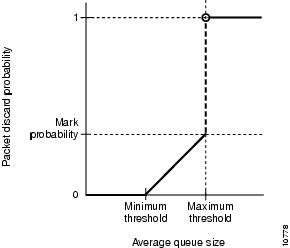
The packet drop probability is based on the minimum threshold, maximum threshold, and mark probability denominator.
When the average queue depth is above the
minimum threshold, RED starts dropping packets. The rate of packet drop
increases linearly as the average queue size increases until the average
queue size reaches the maximum threshold.
The mark probability denominator is the
fraction of packets dropped when the average queue depth is at the
maximum threshold. For example, if the denominator is 512, one out of
every 512 packets is dropped when the average queue is at the maximum
threshold.
When the average queue size is above the maximum threshold, all packets are dropped.
Figure 9 summarizes the packet drop probability.
Figure 9 RED Packet Drop Probability
The minimum threshold value should be set high
enough to maximize the link utilization. If the minimum threshold is too
low, packets may be dropped unnecessarily, and the transmission link
will not be fully used.
The difference between the maximum threshold
and the minimum threshold should be large enough to avoid global
synchronization of TCP hosts (global synchronization of TCP hosts can
occur as multiple TCP hosts reduce their transmission rates). If the
difference between the maximum and minimum thresholds is too small, many
packets may be dropped at once, resulting in global synchronization.
How TCP Handles Traffic Loss
Note The sections
"How TCP Handles Traffic Loss" and
"How the Router Interacts with TCP"
contain detailed information that you need not read in order to use
WRED or to have a general sense of the capabilities of RED. If you want
to understand why problems of global synchronization occur in response
to congestion when tail drop is used by default and how RED addresses
them, read these sections.
When the recipient of TCP traffic—called the
receiver—receives a data segment, it checks the four octet (32-bit)
sequence number of that segment against the number the receiver
expected, which would indicate that the data segment was received in
order. If the numbers match, the receiver delivers all of the data that
it holds to the target application, then it updates the sequence number
to reflect the next number in order, and finally it either immediately
sends an acknowledgment (ACK) packet to the sender or it schedules an
ACK to be sent to the sender after a short delay. The ACK notifies the
sender that the receiver received all data segments up to but not
including the one marked with the new sequence number.
Receivers usually try to send an ACK in
response to alternating data segments they receive; they send the ACK
because for many applications, if the receiver waits out a small delay,
it can efficiently include its reply acknowledgment on a normal response
to the sender. However, when the receiver receives a data segment out
of order, it immediately responds with an ACK to direct the sender to
resend the lost data segment.
When the sender receives an ACK, it makes this
determination: It determines if any data is outstanding. If no data is
outstanding, the sender determines that the ACK is a keepalive, meant to
keep the line active, and it does nothing. If data is outstanding, the
sender determines whether the ACK indicates that the receiver has
received some or none of the data. If the ACK indicates receipt of some
data sent, the sender determines if new credit has been granted to allow
it to send more data. When the ACK indicates receipt of none of the
data sent and there is outstanding data, the sender interprets the ACK
to be a repeatedly sent ACK. This condition indicates that some data was
received out of order, forcing the receiver to remit the first ACK, and
that a second data segment was received out of order, forcing the
receiver to remit the second ACK. In most cases, the receiver would
receive two segments out of order because one of the data segments had
been dropped.
When a TCP sender detects a dropped data
segment, it resends the segment. Then it adjusts its transmission rate
to half of what is was before the drop was detected. This is the TCP
back-off or slow-down behavior. Although this behavior is appropriately
responsive to congestion, problems can arise when multiple TCP sessions
are carried on concurrently with the same router and all TCP senders
slow down transmission of packets at the same time.
How the Router Interacts with TCP
Note The sections
"How TCP Handles Traffic Loss" and
"How the Router Interacts with TCP"
contain detailed information that you need not read in order to use
WRED or to have a general sense of the capabilities of RED. If you want
to understand why problems of global synchronization occur in response
to congestion when tail drop is used by default and how RED addresses
them, read these sections.
To see how the router interacts with TCP, we
will look at an example. In this example, on average, the router
receives traffic from one particular TCP stream every other, every 10th,
and every 100th or 200th message in the interface in MAE-EAST or
FIX-WEST. A router can handle multiple concurrent TCP sessions. Because
network flows are additive, there is a high probability that when
traffic exceeds the Transmit Queue Limit (TQL) at all, it will vastly
exceed the limit. However, there is also a high probability that the
excessive traffic depth is temporary and that traffic will not stay
excessively deep except at points where traffic flows merge or at edge
routers.
If the router drops all traffic that exceeds
the TQL, as is done when tail drop is used by default, many TCP sessions
will simultaneously go into slow start. Consequently, traffic
temporarily slows down to the extreme and then all flows slow-start
again; this activity creates a condition of global synchronization.
However, if the router drops no traffic, as is
the case when queueing features such as fair queueing or custom queueing
(CQ) are used, then the data is likely to be stored in main memory,
drastically degrading router performance.
By directing one TCP session at a time to slow
down, RED solves the problems described, allowing for full utilization
of the bandwidth rather than utilization manifesting as crests and
troughs of traffic.
About WRED
WRED combines the capabilities of the RED
algorithm with the IP Precedence feature to provide for preferential
traffic handling of higher priority packets. WRED can selectively
discard lower priority traffic when the interface begins to get
congested and provide differentiated performance characteristics for
different classes of service.
You can configure WRED to ignore IP precedence when making drop decisions so that nonweighted RED behavior is achieved.
For interfaces configured to use the Resource
Reservation Protocol (RSVP) feature, WRED chooses packets from other
flows to drop rather than the RSVP flows. Also, IP Precedence governs
which packets are dropped—traffic that is at a lower precedence has a
higher drop rate and therefore is more likely to be throttled back.
WRED differs from other congestion avoidance
techniques such as queueing strategies because it attempts to anticipate
and avoid congestion rather than control congestion once it occurs.
Why Use WRED?
WRED makes early detection of congestion
possible and provides for multiple classes of traffic. It also protects
against global synchronization. For these reasons, WRED is useful on any
output interface where you expect congestion to occur.
However, WRED is usually used in the core
routers of a network, rather than at the edge of the network. Edge
routers assign IP precedences to packets as they enter the network. WRED
uses these precedences to determine how to treat different types of
traffic.
WRED provides separate thresholds and weights
for different IP precedences, allowing you to provide different
qualities of service in regard to packet dropping for different traffic
types. Standard traffic may be dropped more frequently than premium
traffic during periods of congestion.
WRED is also RSVP-aware, and it can provide the controlled-load QoS service of integrated service.
How It Works
By randomly dropping packets prior to periods
of high congestion, WRED tells the packet source to decrease its
transmission rate. If the packet source is using TCP, it will decrease
its transmission rate until all the packets reach their destination,
which indicates that the congestion is cleared.
WRED generally drops packets selectively based
on IP precedence. Packets with a higher IP precedence are less likely to
be dropped than packets with a lower precedence. Thus, the higher the
priority of a packet, the higher the probability that the packet will be
delivered.
WRED reduces the chances of tail drop by
selectively dropping packets when the output interface begins to show
signs of congestion. By dropping some packets early rather than waiting
until the queue is full, WRED avoids dropping large numbers of packets
at once and minimizes the chances of global synchronization. Thus, WRED
allows the transmission line to be used fully at all times.
In addition, WRED statistically drops more
packets from large users than small. Therefore, traffic sources that
generate the most traffic are more likely to be slowed down than traffic
sources that generate little traffic.
WRED avoids the globalization problems that
occur when tail drop is used as the congestion avoidance mechanism.
Global synchronization manifests when multiple TCP hosts reduce their
transmission rates in response to packet dropping, then increase their
transmission rates once again when the congestion is reduced.
WRED is only useful when the bulk of the
traffic is TCP/IP traffic. With TCP, dropped packets indicate
congestion, so the packet source will reduce its transmission rate. With
other protocols, packet sources may not respond or may resend dropped
packets at the same rate. Thus, dropping packets does not decrease
congestion.
WRED treats non-IP traffic as precedence 0, the
lowest precedence. Therefore, non-IP traffic, in general, is more
likely to be dropped than IP traffic.
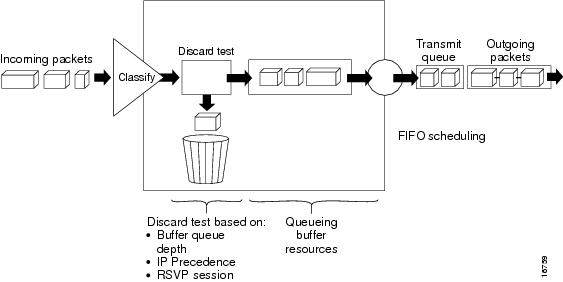
Figure 10 illustrates how WRED works.
Figure 10 Weighted Random Early Detection
Average Queue Size
The router automatically determines parameters
to use in the WRED calculations. The average queue size is based on the
previous average and the current size of the queue. The formula is:
average = (old_average * (1-2 -n)) + (current_queue_size * 2 -n)
where n is the exponential weight factor, a user-configurable value.
For high values of n,
the previous average becomes more important. A large factor smooths out
the peaks and lows in queue length. The average queue size is unlikely
to change very quickly, avoiding drastic swings in size. The WRED
process will be slow to start dropping packets, but it may continue
dropping packets for a time after the actual queue size has fallen below
the minimum threshold. The slow-moving average will accommodate
temporary bursts in traffic.
Note If the value of
n gets too high, WRED will not react to congestion. Packets will be sent or dropped as if WRED were not in effect.
For low values of n,
the average queue size closely tracks the current queue size. The
resulting average may fluctuate with changes in the traffic levels. In
this case, the WRED process responds quickly to long queues. Once the
queue falls below the minimum threshold, the process will stop dropping
packets.
If the value of n gets too low, WRED will overreact to temporary traffic bursts and drop traffic unnecessarily.
Restrictions
You cannot configure WRED on the same interface
as Route Switch Processor (RSP)-based CQ, priority queueing (PQ), or
weighted fair queueing (WFQ).
Distributed Weighted Random Early Detection
Distributed WRED (DWRED) is an implementation
of WRED for the Versatile Interface Processor (VIP). DWRED provides the
complete set of functions for the VIP that WRED provides on standard
Cisco IOS platforms.
The DWRED feature is only supported on Cisco
7000 series routers with an RSP-based RSP7000 interface processor and
Cisco 7500 series routers with a VIP-based VIP2-40 or greater interface
processor. A VIP2-50 interface processor is strongly recommended when
the aggregate line rate of the port adapters on the VIP is greater than
DS3. A VIP2-50 interface processor is required for OC-3 rates.
DWRED is configured the same way as WRED. If
you enable WRED on a suitable VIP interface, such as a VIP2-40 or
greater with at least 2 MB of SRAM, DWRED will be enabled instead.
In order to use DWRED, distributed Cisco
Express Forwarding (dCEF) switching must be enabled on the interface.
For information about dCEF, refer to the Cisco IOS Switching Services Configuration Guide and the Cisco IOS Switching Services Command Reference.
You can configure both DWRED and distributed
weighted fair queueing (DWFQ) on the same interface, but you cannot
configure distributed WRED on an interface for which RSP-based CQ, PQ,
or WFQ is configured.
You can enable DWRED using the Modular Quality
of Service Command-Line Interface (Modular QoS CLI) feature. For
complete conceptual and configuration information on the Modular QoS CLI
feature, see the chapter
"Modular Quality of Service Command-Line Interface Overview" of this book.
How It Works
When a packet arrives and DWRED is enabled, the following events occur:
•
If the average is less than the minimum queue threshold, the arriving packet is queued.
•
If
the average is between the minimum queue threshold and the maximum
queue threshold, the packet is either dropped or queued, depending on
the packet drop probability. See the
"Packet-Drop Probability" section for details.
•
If the average queue size is greater than the maximum queue threshold, the packet is automatically dropped.
Average Queue Size
The average queue size is based on the previous average and the current size of the queue. The formula is:
average = (old_average * (1-1/2^n)) + (current_queue_size * 1/2^n)
where n is the exponential weight factor, a user-configurable value.
For high values of n,
the previous average queue size becomes more important. A large factor
smooths out the peaks and lows in queue length. The average queue size
is unlikely to change very quickly, avoiding drastic swings in size. The
WRED process will be slow to start dropping packets, but it may
continue dropping packets for a time after the actual queue size has
fallen below the minimum threshold. The slow-moving average will
accommodate temporary bursts in traffic.
Note If the value of
n gets too high, WRED will not react to congestion. Packets will be sent or dropped as if WRED were not in effect.
For low values of n,
the average queue size closely tracks the current queue size. The
resulting average may fluctuate with changes in the traffic levels. In
this case, the WRED process responds quickly to long queues. Once the
queue falls below the minimum threshold, the process stops dropping
packets.
If the value of n gets too low, WRED will overreact to temporary traffic bursts and drop traffic unnecessarily.
Packet-Drop Probability
The probability that a packet will be dropped
is based on the minimum threshold, maximum threshold, and mark
probability denominator.
When the average queue size is above the
minimum threshold, RED starts dropping packets. The rate of packet drop
increases linearly as the average queue size increases, until the
average queue size reaches the maximum threshold.
The mark probability denominator is the
fraction of packets dropped when the average queue size is at the
maximum threshold. For example, if the denominator is 512, one out of
every 512 packets is dropped when the average queue is at the maximum
threshold.
When the average queue size is above the maximum threshold, all packets are dropped.
Figure 11 summarizes the packet drop probability.
Figure 11 Packet Drop Probability
The minimum threshold value should be set high
enough to maximize the link utilization. If the minimum threshold is too
low, packets may be dropped unnecessarily, and the transmission link
will not be fully used.
The difference between the maximum threshold
and the minimum threshold should be large enough to avoid global
synchronization of TCP hosts (global synchronization of TCP hosts can
occur as multiple TCP hosts reduce their transmission rates). If the
difference between the maximum and minimum thresholds is too small, many
packets may be dropped at once, resulting in global synchronization.
Why Use DWRED?
DWRED provides faster performance than does
RSP-based WRED. You should run DWRED on the VIP if you want to achieve
very high speed on the Cisco 7500 series platform—for example, you can
achieve speed at the OC-3 rates by running WRED on a VIP2-50 interface
processor.
Additionally, the same reasons you would use WRED on standard Cisco IOS platforms apply to using DWRED. (See the section
"Why Use WRED?"
earlier in this chapter.) For instance, when WRED or DWRED is not
configured, tail drop is enacted during periods of congestion. Enabling
DWRED obviates the global synchronization problems that result when tail
drop is used to avoid congestion.
The DWRED feature provides the benefit of
consistent traffic flows. When RED is not configured, output buffers
fill during periods of congestion. When the buffers are full, tail drop
occurs; all additional packets are dropped. Because the packets are
dropped all at once, global synchronization of TCP hosts can occur as
multiple TCP hosts reduce their transmission rates. The congestion
clears, and the TCP hosts increase their transmission rates, resulting
in waves of congestion followed by periods when the transmission link is
not fully used.
RED reduces the chances of tail drop by
selectively dropping packets when the output interface begins to show
signs of congestion. By dropping some packets early rather than waiting
until the buffer is full, RED avoids dropping large numbers of packets
at once and minimizes the chances of global synchronization. Thus, RED
allows the transmission line to be used fully at all times.
In addition, RED statistically drops more
packets from large users than small. Therefore, traffic sources that
generate the most traffic are more likely to be slowed down than traffic
sources that generate little traffic.
DWRED provides separate thresholds and weights
for different IP precedences, allowing you to provide different
qualities of service for different traffic. Standard traffic may be
dropped more frequently than premium traffic during periods of
congestion.
Restrictions
The following restrictions apply to the DWRED feature:
•
Interface-based
DWRED cannot be configured on a subinterface. (A subinterface is one of
a number of virtual interfaces on a single physical interface.)
•
DWRED is not supported on Fast EtherChannel and tunnel interfaces.
•
RSVP is not supported on DWRED.
•
DWRED
is useful only when the bulk of the traffic is TCP/IP traffic. With
TCP, dropped packets indicate congestion, so the packet source reduces
its transmission rate. With other protocols, packet sources may not
respond or may resend dropped packets at the same rate. Thus, dropping
packets does not necessarily decrease congestion.
•
DWRED
treats non-IP traffic as precedence 0, the lowest precedence.
Therefore, non-IP traffic is usually more likely to be dropped than IP
traffic.
•
DWRED
cannot be configured on the same interface as RSP-based CQ, PQ, or WFQ.
However, both DWRED and DWFQ can be configured on the same interface.
Note Do not use the
match protocol command
to create a traffic class with a non-IP protocol as a match criterion.
The VIP does not support matching of non-IP protocols.
Prerequisites
This section provides the prerequisites that must be met before you configure the DWRED feature.
Weighted Fair Queueing
Attaching a service policy to an interface
disables WFQ on that interface if WFQ is configured for the interface.
For this reason, you should ensure that WFQ is not enabled on such an
interface before configuring DWRED.
For information on WFQ, see the chapter
"Configuring Weighted Fair Queueing" in this book.
WRED
Attaching a service policy configured to use
WRED to an interface disables WRED on that interface. If any of the
traffic classes that you configure in a policy map use WRED for packet
drop instead of tail drop, you must ensure that WRED is not configured
on the interface to which you intend to attach that service policy.
Access Control Lists
You can specify a numbered access list as the
match criterion for any traffic class that you create. For this reason,
before configuring DWRED you should know how to configure access lists.
Cisco Express Forwarding
In order to use DWRED, dCEF switching must be enabled on the interface. For information on dCEF, refer to the Cisco IOS Switching Services Configuration Guide.
Flow-Based WRED
Flow-based WRED is a feature that forces WRED
to afford greater fairness to all flows on an interface in regard to how
packets are dropped.
Why Use Flow-Based WRED?
Before you consider the advantages that use of
flow-based WRED offers, it helps to think about how WRED (without
flow-based WRED configured) affects different kinds of packet flows.
Even before flow-based WRED classifies packet flows, flows can be
thought of as belonging to one of the following categories:
•
Nonadaptive flows, which are flows that do not respond to congestion.
•
Robust flows, which on average have a uniform data rate and slow down in response to congestion.
•
Fragile flows, which, though congestion-aware, have fewer packets buffered at a gateway than do robust flows.
WRED tends toward bias against fragile flows
because all flows, even those with relatively fewer packets in the
output queue, are susceptible to packet drop during periods of
congestion. Though fragile flows have fewer buffered packets, they are
dropped at the same rate as packets of other flows.
To provide fairness to all flows, flow-based WRED has the following features:
•
It
ensures that flows that respond to WRED packet drops (by backing off
packet transmission) are protected from flows that do not respond to
WRED packet drops.
•
It prohibits a single flow from monopolizing the buffer resources at an interface.
How It Works
Flow-based WRED relies on the following two main approaches to remedy the problem of unfair packet drop:
•
It classifies incoming traffic into flows based on parameters such as destination and source addresses and ports.
•
It maintains state about active flows, which are flows that have packets in the output queues.
Flow-based WRED uses this classification and
state information to ensure that each flow does not consume more than
its permitted share of the output buffer resources. Flow-based WRED
determines which flows monopolize resources and it more heavily
penalizes these flows.
To ensure fairness among flows, flow-based WRED
maintains a count of the number of active flows that exist through an
output interface. Given the number of active flows and the output queue
size, flow-based WRED determines the number of buffers available per
flow.
To allow for some burstiness, flow-based WRED
scales the number of buffers available per flow by a configured factor
and allows each active flow to have a certain number of packets in the
output queue. This scaling factor is common to all flows. The outcome of
the scaled number of buffers becomes the per-flow limit. When a flow
exceeds the per-flow limit, the probability that a packet from that flow
will be dropped increases.
DiffServ Compliant WRED
DiffServ Compliant WRED extends the
functionality of WRED to enable support for DiffServ and AF Per Hop
Behavior PHB. This feature enables customers to implement AF PHB by
coloring packets according to DSCP values and then assigning
preferential drop probabilities to those packets.
Note This
feature can be used with IP packets only. It is not intended for use
with Multiprotocol Label Switching (MPLS)-encapsulated packets.
The Class-Based Quality of Service MIB supports this feature. This MIB is actually the following two MIBs:
•
CISCO-CLASS-BASED-QOS-MIB
•
CISCO-CLASS-BASED-QOS-CAPABILITY-MIB
The DiffServ Compliant WRED feature supports the following RFCs:
•
RFC 2474,
Definition of the Differentiated Services Field (DS Field) in the IPv4 and IPv6 Headers
•
RFC 2475,
An Architecture for Differentiated Services Framework
•
RFC 2597,
Assured Forwarding PHB
•
RFC 2598,
An Expedited Forwarding PHB
How It Works
The DiffServ Compliant WRED feature enables
WRED to use the DSCP value when it calculates the drop probability for a
packet. The DSCP value is the first six bits of the IP type of service
(ToS) byte.
This feature adds two new commands, random-detect dscp and dscp. It also adds two new arguments, dscp-based and prec-based, to two existing WRED-related commands—the random-detect (interface) command and the random-detect-group command.
The dscp-based argument enables WRED to use the DSCP value of a packet when it calculates the drop probability for the packet. The prec-based argument enables WRED to use the IP Precedence value of a packet when it calculates the drop probability for the packet.
These arguments are optional (you need not use
any of them to use the commands) but they are also mutually exclusive.
That is, if you use the dscp-based argument, you cannot use the prec-based argument with the same command.
After enabling WRED to use the DSCP value, you can then use the new random-detect dscp command to change the minimum and maximum packet thresholds for that DSCP value.
Three scenarios for using these arguments are provided.
Usage Scenarios
The new dscp-based and prec-based
arguments can be used whether you are using WRED at the interface
level, at the per-virtual circuit (VC) level, or at the class level (as
part of class-based WFQ (CBWFQ) with policy maps).
WRED at the Interface Level
At the interface level, if you want to have WRED use the DSCP value when it calculates the drop probability, you can use the dscp-based argument with the random-detect (interface) command to specify the DSCP value. Then use the random-detect dscp command to specify the minimum and maximum thresholds for the DSCP value.
WRED at the per-VC Level
At the per-VC level, if you want to have WRED use the DSCP value when it calculates the drop probability, you can use the dscp-based argument with the random-detect-group command. Then use the dscp command to specify the minimum and maximum thresholds for the DSCP value or the mark-probability denominator.
This configuration can then be applied to each VC in the network.
WRED at the Class Level
If you are using WRED at the class level (with CBWFQ), the dscp-based and prec-based arguments can be used within the policy map.
First, specify the policy map, the class, and
the bandwidth. Then, if you want WRED to use the DSCP value when it
calculates the drop probability, use the dscp-based argument with the random-detect (interface) command to specify the DSCP value. Then use the random-detect dscp command to modify the default minimum and maximum thresholds for the DSCP value.
This configuration can then be applied wherever
policy maps are attached (for example, at the interface level, the
per-VC level, or the shaper level).
Usage Points to Note
Remember the following points when using the new commands and the new arguments included with this feature:
•
If you use the
dscp-based argument, WRED will use the DSCP value to calculate the drop probability.
•
If you use the
prec-based argument, WRED will use the IP Precedence value to calculate the drop probability.
•
The
dscp-based and
prec-based arguments are mutually exclusive.
•
If
you do not specify either argument, WRED will use the IP Precedence
value to calculate the drop probability (the default method).
•
The
random-detect dscp command must be used in conjunction with the
random-detect (interface)
command.
•
The
random-detect dscp command can only be used if you use the
dscp-based argument with the
random-detect (interface)
command.
•
The
dscp command must be used in conjunction with the
random-detect-group command.
•
The
dscp command can only be used if you use the
dscp-based argument with the
random-detect-group command.
For more information about using these commands, refer to the Cisco IOS Quality of Service Command Reference.
http://mars.tekkom.dk/cisco/ccnp4/ch4/4_6_2/index.html